Letting other people see it
There are two basic ways for other people to see the image on your webpage.- Send regular updates of the picture to your website using FTP.
- Visitors to your website download the image from there, in the normal way like any other image.
- Keep the image on your Home PC and allow visitors to see it there.
- Visitors to your website are re-directed to your Home PC to download the image from there.
Option 1 certainly has the advantage of being simple (and more secure from 'hackers') and, for a single webcam image, is probably the option to choose. It's main limitation is the time it takes for you to establish an FTP connection to your website, upload the image and close the connection.

|
ISP's vary in this regard and the time taken can vary depending on network conditions. Webcam images vary in
size from around 8 kbytes to 20 kbytes or more so it's impossible to give even an average time but I
wouldn't upload images using this method in thess than about 20-second intervals. Option 2 requires you to run 'server' software on your PC. This is permanently connected to the internet via your IP address and visitors to your website are re-directed to your home PC via that address. |
Certainly, if you're considering streaming live video as well, you will need a permanently open connection to the internet anyway and it's much easier to host the associated web pages on your home PC rather than be constantly uploading them to your website.
One thing to consider if you use option 2 is that your IP address needs to be static. Some ISPs provide a static IP address (usually for a fee) and some do not. Generally, however, if you stay connected, your IP address will remain unchanged anyway. There is also software available which keeps an 'eye' on your IP address and will update any webpages accordingly.
The software
Once you know what sort of software you need, you can search the web. I can't, in all honesty, recommend any particular software because it's so varied and your own requirements differ that it really is best to choose for yourself.One thing to be aware of, though, is freeware or shareware software provided by companies that offer to host your images for you. My own personal opinion is that there's usually a catch. Either your webpage has to carry an advertisement or your system is open to Spyware or worse. Also, your image is generally shared with lots of others - over which, the quality or content you have absolutely no control. Personally, as I wrote above, I prefer to host the image on my own computer and I take responsibility for setting up my own firewall and any other precautions I choose to make. (Just my opinion)
|
I suppose I'm lucky in that I can attempt to write my own software to suit my own particular requirements and I am
currently using WebMaster which acts as both the server and the video capture software. It's also able
to run the video capture on its own and upload the image by FTP, if required.
However, I am most definately not trying to 'push' my own software - there will certainly be stuff out there which better suits your needs. In these few pages, I'm just trying to help you decide what you need.
So, how does it all fit together? | 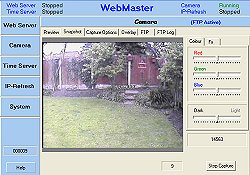
|
© Copyright